


Local Raster-to-Vector Conversion
Minimize redrawing from scanned drawings.
Convert PDFs and images into CAD-editable DXF.
DARE Scanner is a Windows raster-to-vector conversion app for paper drawings, scanned PDFs, JPEG, PNG, TIFF, BMP, and GIF files. It analyzes drawing lines, arcs, text, and annotations locally, then converts them into DXF data that can be edited and reused in CAD.
Windows 11 compatible
PDF / JPEG / PNG / TIFF / BMP / GIF to DXF
Automatic line, arc, and text recognition
Built for mechanical, architectural, civil, and MEP drawings
No cloud upload required
ScanData.png - DARE Scanner
Ready to convert
Click to see instant vectorization
Still keeping paper drawings and old PDFs that cannot be edited?
Manual CAD conversion of scanned drawings creates hidden costs in everyday work.
Underutilized Drawing Assets
Paper drawings and old PDF drawings can be viewed, but they cannot be edited in CAD as-is. Valuable past drawings remain difficult to reuse, leaving your drawing assets underutilized.
Time-Consuming Manual Tracing
Manually tracing lines or retyping text and notes takes more time than expected. As the number of drawings grows, converting them into usable CAD data becomes a major workload.
Concerns About External Uploads
Web-based conversion services can be convenient, but they often require drawing data to be uploaded to external servers. For confidential or customer-owned drawings, that can raise security concerns.
DARE Scanner lets you convert PDFs and images to DXF without uploading your drawings to the cloud.
Convert PDFs and images to DXF in three steps.
No complex preprocessing.
No cloud upload required.
Convert scanned drawings into DXF directly on Windows.
01
Install & Open
Install DARE Scanner on Windows, then select the PDF, TIFF, PNG, JPEG, or other image drawing you want to convert.
02
Convert
Click the convert button and DARE Scanner recognizes lines, arcs, and text. Raster-to-vector conversion runs locally and creates DXF data for CAD reuse.
03
Open in CAD
The converted DXF can be opened in AutoCAD, Jw_cad, IJCAD, and other DXF-compatible CAD applications. Converted geometry and text objects can be checked and edited in CAD.
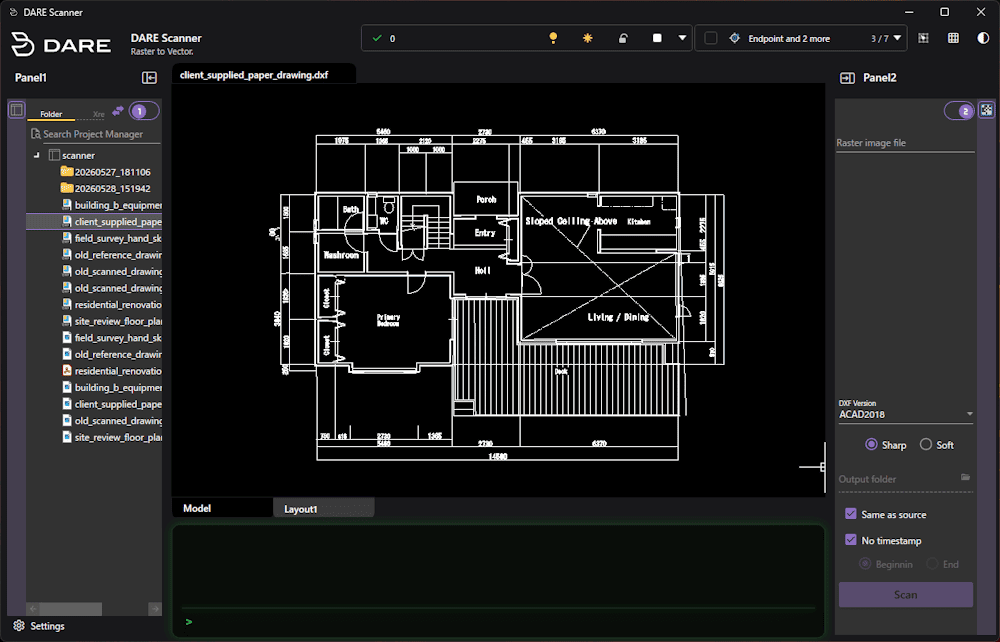
After the license checkout process, offline operation is also supported. Drawing conversion runs locally, without uploading drawing data to the cloud.
Input
PDF / JPEG / PNG / TIFF / BMP / GIF
Output
DXF
Platform
Windows 11
CAD apps
AutoCAD / Jw_cad / IJCAD / DXF-compatible CAD
Convert raster PDFs into CAD-editable DXF.
Turn paper drawings and scanned PDFs into DXF data that can be reused in CAD. DARE Scanner analyzes drawing lines, text information, and geometric shapes to reduce manual tracing and retyping.
⌁
Vectorize Drawing Lines
Vectorize Drawing Lines
Analyzes drawing lines saved as image data and converts them into vector data such as lines and arcs that can be handled in CAD.
Aa
Convert Text and Notes
Convert Text and Notes
Uses OCR to convert drawing text and annotations into editable text objects, helping reduce manual retyping.
DXF
Designed for CAD Editing
Designed for CAD Editing
Creates DXF data with CAD editing in mind, so converted drawings can be checked, adjusted, and reused in CAD workflows.
DARE Scanner combines drawing-line vectorization, OCR, and shape extraction to support CAD conversion of paper drawings and scanned PDFs.
Desktop local app vs. browser-based conversion services
DARE Scanner is designed for users who want to convert scanned PDFs and image drawings to DXF locally.
Browser-based conversion services can be convenient, but they usually require drawing data to be uploaded before conversion.
Category
DARE Scanner
Desktop app
Browser-based conversion service
Web service
Usage environment
Windows desktop app
Web browser
Main use case
Raster-to-vector conversion for paper drawings, scanned PDFs, and image drawings
General online file conversion
Drawing data processing
Runs locally on your PC
Usually requires uploading files to an external server
Input formats
PDF / JPEG / PNG / TIFF / BMP / GIF
Depends on the service
Output format
DXF
Depends on the service
Offline use
Available after license checkout
Not supported
Best for
Converting confidential drawings locally to DXF
Quick online conversion when cloud upload is acceptable
Price
$15 / month or $150 / year
Depends on the service
* Pricing and features for DARE Scanner are as of May 2026.
Try DARE Scanner free for 7 days.
Convert your own PDFs and image drawings to DXF and check the output quality in CAD.
No feature limits during the trial.
You can cancel your subscription anytime from your account page.
Monthly
$15
/month
Billed monthly | Cancel anytime
Annual
$150
/year
Best value annual license
Secure checkout
Full access during trial
No charge for 7 days
Credit card registration required
Raster-to-vector conversion, PDF to DXF conversion, and image to DXF conversion FAQ
What is raster-to-vector conversion?
What is raster-to-vector conversion?
Raster-to-vector conversion is the process of converting raster images or scanned PDFs into vector data that can be edited in CAD. DARE Scanner analyzes paper drawings, raster PDFs, JPEG, PNG, TIFF, BMP, and GIF files, then outputs DXF.
Can I convert PDF drawings into a format editable in AutoCAD?
Can I convert PDF drawings into a format editable in AutoCAD?
Yes. DARE Scanner can convert scanned PDF drawings into DXF. DXF is a standard CAD format that can be opened in AutoCAD, Jw_cad, IJCAD, and many other DXF-compatible CAD applications.
Can I convert images to DXF?
Can I convert images to DXF?
Yes. DARE Scanner supports PDF, JPEG, PNG, TIFF, BMP, and GIF as input formats, and outputs DXF. For better recognition of fine lines and text, clear and high-resolution images are recommended.
Will my drawing data ever be uploaded to the cloud?
Will my drawing data ever be uploaded to the cloud?
No cloud upload is required for drawing conversion. The conversion process runs on your Windows PC. An internet connection may be required for license authentication and payment-related processes.
Which CAD applications can open the converted DXF?
Which CAD applications can open the converted DXF?
The converted DXF can be opened in CAD applications that support standard DXF, including AutoCAD, Jw_cad, and IJCAD.
Is the 7-day free trial enough to evaluate it properly?
Is the 7-day free trial enough to evaluate it properly?
Yes. The free trial lets you test DARE Scanner with your own drawings. We recommend converting a few representative drawings to check line conversion, text recognition, and CAD editability before continuing.
What happens after the free trial ends?
What happens after the free trial ends?
After the 7-day free trial, the subscription renews automatically based on the selected plan. If you do not want to continue, you can cancel from your account page during the free trial. If you cancel during the free trial, you will not be charged.
What are the system requirements?
What are the system requirements?
DARE Scanner is a Windows app and supports Windows 11.
Minimize retyping. Minimize redrawing.
Convert scanned drawings to DXF.
DARE Scanner is a Windows raster-to-vector conversion app that converts PDFs and image drawings into DXF locally. Reuse paper drawings, scanned PDFs, and raster images as CAD-editable drawing data.
Start 7-Day Free Trial7-day free trial with full access
Convert PDF, JPEG, PNG, TIFF, BMP, and GIF to DXF
Automatically recognizes lines, arcs, text, and annotations
No cloud upload required for drawing conversion
Open and edit converted DXF in AutoCAD, Jw_cad, IJCAD, and other DXF-compatible CAD apps
Built by SystemMetrix, developers of IJCAD
Questions? Contact the SystemMetrix team via our contact form.